
Video Element Documentation
Movi Streaming Video Library - Custom HTML Video Element
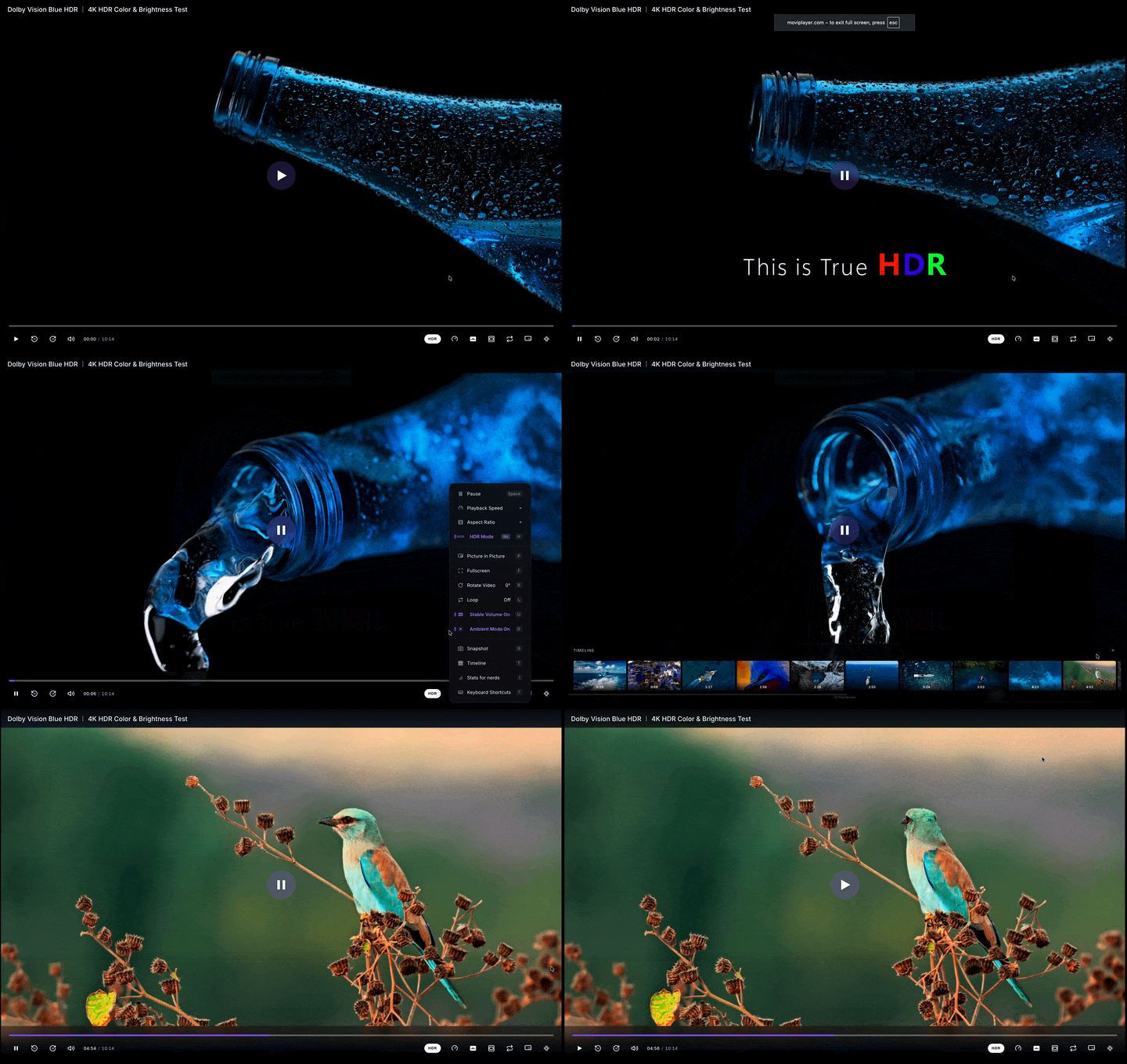
Table of Contents
- Overview
- Quick Start
- API Reference
- Attributes
- Properties
- Methods
- Events
- UI Controls
- Gestures
- Theming
- Advanced Features
- Examples
Overview
The <movi-player> custom HTML element provides a native <video>-like interface with enhanced capabilities:
- Drop-in Replacement: Compatible with standard HTMLVideoElement API
- Built-in Controls: Professional UI with play, progress, volume, settings
- Gesture Support: Touch-friendly with tap, swipe, pinch gestures
- HDR Support: Automatic HDR detection and Display-P3 rendering
- Theme System: Dark/Light modes with customizable styling
- Ambient Mode: Extracts and displays average frame colors
- Track Selection: Multi-audio/subtitle track selection UI
- Object Fit Modes: contain/cover/fill/zoom with smooth transitions
- Audio-Only Mode: Dedicated strip UI with embedded cover art for audio files (MP3, FLAC, AAC, Opus)
- Muted Autoplay Fallback: Starts muted when autoplay is blocked, shows tap-to-unmute pill
- Pitch-Preserving Time-Stretch: Signalsmith Stretch for clean non-1x playback
- Custom SourceAdapter: Plug any byte protocol (WebSocket, WebRTC, IndexedDB) directly
Key File: src/render/MoviElement.ts
Browser Compatibility
| Browser | Version | Notes |
|---|---|---|
| Chrome | 110+ | Full support (WebCodecs) |
| Edge | 110+ | Full support |
| Safari | 18+ | Full support |
| Firefox | 130+ | WebCodecs Yes, HDR Limited |
Quick Start
Installation
npm install movi-playerBasic Usage
<!DOCTYPE html>
<html>
  <head>
    <script type="module">
      import "movi-player";
    </script>
  </head>
  <body>
    <movi-player
      src="https://example.com/video.mp4"
      controls
      autoplay
      muted
      style="width: 100%; height: 500px;"
    ></movi-player>
  </body>
</html>
That's it! The element works just like a native <video> tag.
API Reference
Element Registration
The custom element is automatically registered on import:
import "movi-player"; // Registers <movi-player>Element Name: movi-player (hyphen required per Web Components spec)
Attributes
Media Source
src
Specifies the video source URL or File object.
<!-- HTTP URL -->
<movi-player src="https://example.com/video.mp4"></movi-player>

<!-- Local file via JavaScript -->
<movi-player id="player"></movi-player>
<script>
  const player = document.getElementById("player");
  const fileInput = document.getElementById("file");
  fileInput.addEventListener("change", (e) => {
    player.src = e.target.files[0];
  });
</script>
Supported Formats:
- MP4 (
.mp4,.m4v) - WebM (
.webm) - Matroska (
.mkv) - QuickTime (
.mov) - MPEG-TS (
.ts) - Any FFmpeg-supported format
- Adaptive streams — HLS (
.m3u8), MPEG-DASH (.mpd), Smooth Streaming (.ism) — auto-routed to Shaka Player (see Adaptive Streaming)
sourceAdapter (property)
JavaScript-only property — bypasses src entirely and feeds bytes through a custom SourceAdapter. Use this when your media doesn't live behind an HTTP URL or a local File (WebSocket, WebRTC data channel, IndexedDB, custom encryption, etc.) — you keep the full <movi-player> UI without re-implementing controls.
<movi-player id="player" controls></movi-player>
<script type="module">
  import { MyWebSocketSource } from "./my-source.js";

  const player = document.getElementById("player");
  player.sourceAdapter = new MyWebSocketSource("wss://media.example.com", 12_345_678);
</script>
Mutual exclusion with src:
| You set | Result |
|---|---|
src | Clears sourceAdapter, loads via URL/File |
sourceAdapter | Clears src + src attribute, loads via adapter |
| Both | Last assignment wins |
null | Clears that source; both null → empty state |
Setting either re-runs the full source-switch flow: disposes the old player, fires loadstart, and re-initializes. There's no separate attribute — pass adapter instances through JavaScript.
// Swap protocols on a live element
player.sourceAdapter = new MyWebRTCSource(channel);

// Later, switch back to a plain URL
player.src = "https://example.com/video.mp4"; // sourceAdapter auto-clears

// Clear everything
player.src = null;
Programmatic-only
There's no sourceadapter HTML attribute — adapter instances aren't serializable. Always assign via JS (or the setSourceAdapter() convenience method, identical to the property setter).
Playback Behavior
autoplay
Starts playback automatically when loaded.
<movi-player src="video.mp4" autoplay></movi-player>Note: Most browsers require muted attribute for autoplay to work.
loop
Restarts playback when video ends.
<movi-player src="video.mp4" loop></movi-player>muted
Mutes audio by default.
<movi-player src="video.mp4" muted></movi-player>volume
Sets the initial audio volume (0.0 to 1.0). User preference persists across reloads via OPFS and overrides this default on subsequent loads.
<movi-player src="video.mp4" volume="0.5"></movi-player>playbackrate
Sets the initial playback speed. Persists across reloads like volume.
<movi-player src="video.mp4" playbackrate="1.5"></movi-player>Note: Attribute name is all lowercase (playbackrate). The JS property is camelCase (player.playbackRate).
playsinline
Prevents fullscreen on iOS (plays inline instead).
<movi-player src="video.mp4" playsinline></movi-player>UI Configuration
controls
Shows/hides the built-in UI controls.
<!-- With controls -->
<movi-player src="video.mp4" controls></movi-player>

<!-- Without controls (custom UI) -->
<movi-player src="video.mp4"></movi-player>
poster
Displays an image before playback starts.
<movi-player src="video.mp4" poster="thumbnail.jpg"></movi-player>postertime
Generates a native-resolution poster frame from a timestamp instead of (or as a fallback for) poster. Useful when you don't have a pre-rendered thumbnail but want to show a representative frame.
Accepted formats:
"10%"— percentage of total duration"5"or"5s"— seconds"1:30"—mm:ss"0:01:30"—hh:mm:ss
<!-- Show frame at 10% of duration -->
<movi-player src="video.mp4" postertime="10%"></movi-player>

<!-- Show frame at 1 minute 30 seconds -->
<movi-player src="video.mp4" postertime="1:30"></movi-player>
Behavior:
- Runs on an isolated thumbnail pipeline (separate WASM +
ThumbnailBindings); does not disturb the main player's clock or decoder. - Respects the video's rotation metadata so portrait videos display correctly.
- Race-guarded — a generation counter invalidates in-flight generators on every
srcchange so a late frame from the old source can't paint over the new poster. - Skipped if an explicit
posterURL is set, or if the source is encrypted/DRM (those pipelines have their own protected paths). - Only
Fileand plain HTTP URL sources are supported.
Use Case: Playlist UIs that don't want to ship pre-rendered thumbnails but still want a sharp, native-resolution preview before play.
title
Sets the video title shown in the in-player overlay. Unlike the global HTML title attribute, this does not trigger a native browser tooltip on hover.
<movi-player src="video.mp4" title="My Vacation Video" showtitle></movi-player>Use together with showtitle to render the title bar. Auto-filled from metadata/filename if not provided.
showtitle
Shows the title bar overlay at the top of the player.
<movi-player src="video.mp4" title="Intro" showtitle></movi-player>Auto-hides with the controls.
Advanced Attributes
renderer
Chooses the rendering backend.
Values:
canvas(default) — WebGL2 canvas rendering with full features (HDR, rotation, snapshots, ambient mode)
<movi-player src="video.mp4" renderer="canvas"></movi-player>MSE / Adaptive streaming / DRM
There is no separate mse renderer — adaptive streams (HLS .m3u8, MPEG-DASH .mpd, Smooth Streaming .ism) are handled internally via Shaka Player (with hls.js / dash.js as automatic fallbacks) feeding a hidden native <video> element whose frames are drawn to the canvas. DRM is opt-in via the drm + licenseurl attributes. All of these paths are selected automatically from the source URL; you don't pick them via renderer.
objectfit
Controls how video fills the canvas.
Values:
contain(default) - Fit within bounds, maintain aspect ratiocover- Fill bounds, crop if necessaryfill- Stretch to fill bounds (may distort)zoom- Slightly zoomed in (1.1x)control- User can pinch/zoom to adjust
<movi-player src="video.mp4" objectfit="cover"></movi-player>hdr
Enables/disables HDR rendering.
<!-- HDR enabled (default) -->
<movi-player src="video.mp4" hdr></movi-player>

<!-- Force SDR -->
<movi-player src="video.mp4" hdr="false"></movi-player>
Auto-Detection:
- BT.2020 primaries + PQ/HLG transfer → Display-P3 canvas
- Otherwise → sRGB canvas
theme
Sets the UI theme.
Values:
dark(default)light
<movi-player src="video.mp4" theme="light"></movi-player>ambientmode
Enables ambient background effects.
<movi-player src="video.mp4" ambientmode></movi-player>Effect: Samples average frame colors and applies to wrapper element.
ambientwrapper
Specifies external element for ambient effects.
<div id="wrapper" style="padding: 20px; transition: background 0.5s;">
  <movi-player
    src="video.mp4"
    ambientmode
    ambientwrapper="wrapper"
  ></movi-player>
</div>
thumb
Generates thumbnails on demand (used internally for preview).
<movi-player src="video.mp4" thumb></movi-player>sw
Forces software decoding (using FFmpeg WASM) instead of hardware-accelerated WebCodecs.
<movi-player src="video.mp4" sw></movi-player>Note: Useful if hardware decoding fails or produces visual artifacts for a specific file.
fps
Overrides the video frame rate with a custom value.
Values:
0(default) - Use frame rate from video metadatanumber- Fixed frame rate (e.g.,24,60)
<movi-player src="video.mp4" fps="60"></movi-player>gesturefs
Restricts touch gestures to fullscreen mode only. When enabled, tap/swipe/pinch gestures will only work when the player is in fullscreen.
<movi-player src="video.mp4" gesturefs></movi-player>Use Case: Prevent accidental gesture triggers when player is embedded in scrollable content or near system gesture edges on mobile devices.
nohotkeys
Disables all keyboard shortcuts for playback control.
<movi-player src="video.mp4" nohotkeys></movi-player>Use Case: Useful when embedding player in forms or pages where keyboard shortcuts might conflict with other page functionality.
Disabled Shortcuts:
- Space/K - Play/Pause
- Arrow Left/Right - Seek ±10s
- Arrow Up/Down - Volume ±10%
- F - Fullscreen
- M - Mute/Unmute
startat
Specifies the time (in seconds) where playback should start.
<movi-player src="video.mp4" startat="30"></movi-player>Use Case: Start video at a specific timestamp, useful for sharing video links with timestamps or auto-skipping intros.
fastseek
Enables fast seek controls for quick ±10s navigation.
<movi-player src="video.mp4" fastseek></movi-player>Enables:
- Skip forward/backward buttons in control bar
- Double-tap on left/right sides to seek
- Arrow Left/Right keyboard shortcuts (±10s)
Use Case: Better navigation experience for longer videos (podcasts, lectures, movies).
doubletap
Enables/disables double-tap to seek gesture.
<!-- Enable (default) -->
<movi-player src="video.mp4" doubletap="true"></movi-player>

<!-- Disable -->
<movi-player src="video.mp4" doubletap="false"></movi-player>
Behavior: Double-tap left side seeks -10s, double-tap right side seeks +10s.
themecolor
Sets a custom primary color for the player UI (progress bar, buttons, accents).
<movi-player src="video.mp4" themecolor="#ff5722"></movi-player>Value: Any valid CSS color (hex, rgb, color name).
Use Case: Match player theme to your brand colors.
buffersize
Target prefetch window in megabytes — how far ahead of playback the source should try to keep buffered.
<movi-player src="video.mp4" buffersize="200"></movi-player>Value: Target buffer depth in MB.
Default: 250 for plain HTTP (sliding window at 8% of file size, capped at 250 MB); ~192 for encrypted mode (prefetch high-water × 2 MB block size).
Behavior:
- HTTP source — overrides the sliding-window cap. Files smaller than this value are cached entirely; larger files use a sliding window.
- Encrypted source — scales the prefetch depth (
PREFETCH_HIGH_WATER), refill threshold (LOW_WATER≈ half), and block cache cap (≈ 1.5× target). - File source — no-op (entire file already in memory).
Use Case: Raise for deep-scrub UX on large files; lower for memory-constrained embeds.
resume
Saves playback position to localStorage and shows a resume dialog on reload.
<movi-player src="video.mp4" resume></movi-player>Position is saved every 5 seconds and on pause. Cleared when video ends. Uses URL as key for streams, filename+size for local files.
stablevolume
Enables loudness normalization (DynamicsCompressorNode). Reduces loud scenes and boosts quiet ones.
<movi-player src="video.mp4" stablevolume></movi-player>Toggle at runtime via the UI button or context menu.
subtitledelay
Shifts subtitle timing relative to video, in seconds. Sign matches VLC and mpv: positive values shift subtitles later, negative shifts them earlier.
<!-- Subtitles are 200ms ahead of dialogue — push them later -->
<movi-player src="video.mkv" subtitledelay="0.2" controls></movi-player>
Hotkeys: Z shifts earlier, X shifts later, by 100ms per press. The OSD shows the current offset.
Notes:
- Applies live without re-decoding — shift is computed at the active-cue check, so the same offset works for text and image (PGS/DVB) subtitles.
- Not persisted to
SettingsStorage— sync drift is per-source, so a global value would mis-shift unrelated videos. - File-source only. Streamed sources (HLS) don't expose the timing surface this control depends on, so the UI hides it.
subtitlesize / subtitlecolor / subtitlebg / subtitleedge
Customize subtitle rendering. All four are also exposed in the in-player customize panel under the subtitle menu and persist to localStorage when changed there.
<movi-player
  src="video.mkv"
  subtitlesize="1.2"      <!-- size multiplier; default 1 -->
  subtitlecolor="#FFFF00"  <!-- text color -->
  subtitlebg="0.5"         <!-- background opacity 0..1 -->
  subtitleedge="outline"   <!-- none | shadow | outline | raised -->
  controls
></movi-player>
The size multiplier drives both text (SRT/ASS/VTT) and image (PGS/VOBSUB) subtitles. Edge style applies to text subs only.
encrypted
Enables encrypted video playback. Requires tokenurl and videourl attributes.
<movi-player
  encrypted
  tokenurl="/api/token"
  videourl="/api/video"
  videoid="movie.mp4"
  controls autoplay muted
></movi-player>
See Encrypted Server Example for the complete server implementation.
tokenurl
Token endpoint URL for encrypted playback. Server returns HMAC signing secret and file metadata.
videourl
Video endpoint URL for encrypted playback. Chunks are served with token + HMAC validation.
videoid
Video identifier sent to the token server. Maps to a specific encrypted file on the server.
drm
Enables DRM playback mode for HLS streams. When set, the player switches to a native <video> element + EME API instead of the canvas pipeline. Canvas-only features (rotation, snapshots) are disabled in this mode.
<movi-player
  src="https://example.com/stream.m3u8"
  drm
  licenseurl="https://license.pallycon.com/ri/licenseManager.do"
  controls autoplay
></movi-player>
Works with Widevine (Chrome/Edge/Firefox) and FairPlay (Safari).
licenseurl
Widevine/FairPlay license server URL for DRM playback. Required when drm is set.
<movi-player
  src="stream.m3u8"
  drm
  licenseurl="https://license.example.com/wv"
></movi-player>
Supported providers: PallyCon, EZDRM, BuyDRM, AWS Media Services, custom.
headers
Custom HTTP headers applied to every media network request — adaptive-stream manifests and their segments (Shaka request filter, hls.js xhrSetup, dash.js request interceptor), progressive HTTP, thumbnails, and the encrypted source (stream GET + token refresh). Use it to carry auth tokens, signed-URL headers, or API keys.
<!-- Declarative: a JSON object string -->
<movi-player
  src="https://example.com/master.m3u8"
  headers='{"Authorization":"Bearer eyJ..."}'
  controls
></movi-player>// Property form (preferred for non-trivial maps) — takes an object, not a string
player.headers = { Authorization: `Bearer ${token}`, "X-Api-Key": key };Notes:
- The attribute must be valid JSON; an invalid string is ignored with a console warning.
- A native
<audio>element can't carry custom headers, so whenheadersis set a split-audio track is fetched (with the headers) and played from an in-memory blob URL. - Changing
headerson a connected element with a source reloads it.
audioonly
Data-saver mode — play only the audio and skip the video decode to save CPU and bandwidth. Toggleable live (no reload for muxed/file sources).
<movi-player src="podcast.mkv" audioonly controls></movi-player>player.audioOnly = true; // switch to audio-only at runtime
player.audioOnly = false; // restore videoBehavior by source type:
- Muxed file — the process loop skips the video decode (saves CPU).
- Adaptive stream — switches to an audio-only variant (or the smallest video rendition) with ABR off (saves bandwidth), done live via track selection.
- Split source — stops the demux loop entirely so the video file body never downloads; the native
<audio>drives playback.
The UI forces the album-art / strip surface and disables previews. The attribute maps to the audioOnly property and PlayerConfig.audioOnly.
lcevc / lcevcurl
Enables MPEG-5 Part 2 LCEVC enhancement-layer decoding for adaptive streams. Requires the external lcevc_dec.js library — point lcevcurl at it to lazy-load, or expose a global LCEVCdec.
<movi-player
  src="https://example.com/manifest.mpd"
  lcevc
  lcevcurl="https://cdn.example.com/lcevc_dec.min.js"
  controls
></movi-player>
Maps to PlayerConfig.lcevc / lcevcUrl. Ignored when drm is set.
Standard HTML Attributes
width / height
Sets element dimensions (CSS preferred).
<movi-player src="video.mp4" width="800" height="450"></movi-player>preload
Hints how much data to buffer initially.
Values:
none- Don't preloadmetadata(default) - Load metadata onlyauto- Buffer as much as possible
<movi-player src="video.mp4" preload="auto"></movi-player>crossorigin
CORS mode for cross-origin videos.
Values:
anonymous- No credentialsuse-credentials- Include credentials
<movi-player
  src="https://cdn.example.com/video.mp4"
  crossorigin="anonymous"
></movi-player>
Properties
Media Properties
src: string | File | null
Gets/sets the media source.
const player = document.querySelector("movi-player");

// Set URL
player.src = "https://example.com/video.mp4";

// Set File
player.src = fileObject;

// Get current source
console.log(player.src);
currentTime: number
Gets/sets current playback position (in seconds).
// Get position
console.log(player.currentTime); // 45.2

// Seek to position
player.currentTime = 120.5;
duration: number (read-only)
Total media duration in seconds.
console.log(`Duration: ${player.duration}s`);paused: boolean (read-only)
True if playback is paused.
if (player.paused) {
  console.log("Video is paused");
}
ended: boolean (read-only)
True if playback has reached the end.
if (player.ended) {
  console.log("Video finished");
}
playing: boolean (read-only)
True only while the player is actively playing — distinguishes playing from intermediate states like ready, loading, seeking, and buffering. Useful when deciding whether to carry play state across a source switch (e.g., a playlist).
if (player.playing) {
  console.log("Frame loop is running");
}

// Forward play state to the next playlist item
const wasPlaying = player.playing;
player.src = nextItem.url;
if (wasPlaying) await player.play();
Note: !paused is true even during ready/buffering. Use playing when you want to mean "actively rendering frames right now."
Audio Properties
volume: number
Gets/sets audio volume (0.0 to 1.0).
player.volume = 0.5; // 50% volumemuted: boolean
Gets/sets mute state.
player.muted = true; // MutePlayback Control
playbackRate: number
Gets/sets playback speed multiplier.
player.playbackRate = 1.5; // 1.5x speed
player.playbackRate = 0.5; // Half speed
loop: boolean
Gets/sets loop mode.
player.loop = true; // Enable loopingsw: boolean
Gets/sets whether software decoding is forced.
player.sw = true; // Force software decodingfps: number
Gets/sets custom frame rate override.
player.fps = 24; // Override to 24 FPS
player.fps = 0; // Auto (from metadata)
gesturefs: boolean
Gets/sets whether touch gestures are restricted to fullscreen mode only.
player.gesturefs = true; // Gestures only work in fullscreen
player.gesturefs = false; // Gestures always enabled
nohotkeys: boolean
Gets/sets whether keyboard shortcuts are disabled.
player.nohotkeys = true; // Disable keyboard shortcuts
player.nohotkeys = false; // Enable keyboard shortcuts
startat: number
Gets/sets the starting playback time in seconds.
player.startat = 30; // Start at 30 secondsfastseek: boolean
Gets/sets whether fast seek controls are enabled.
player.fastseek = true; // Enable ±10s skip buttons
player.fastseek = false; // Disable fast seek
doubletap: boolean
Gets/sets whether double-tap to seek is enabled.
player.doubletap = true; // Enable double-tap seek
player.doubletap = false; // Disable double-tap seek
themecolor: string | null
Gets/sets custom theme color for the player UI.
player.themecolor = "#ff5722"; // Set custom color
player.themecolor = null; // Reset to default
buffersize: number
Gets/sets the target prefetch window in megabytes. Applies to both HTTP and encrypted sources; file sources ignore it.
player.buffersize = 400; // Keep ~400 MB buffered ahead
player.buffersize = 0;   // Restore library default
headers: Record<string, string> | null
Gets/sets custom HTTP headers applied to all media requests. See the headers attribute for scope and caveats. Unlike the attribute (a JSON string), the property takes an object.
player.headers = { Authorization: `Bearer ${token}` };
player.headers = null; // Clear
audioOnly: boolean
Gets/sets data-saver audio-only mode. See the audioonly attribute.
player.audioOnly = true;  // Skip video decode / fetch audio-only rendition
player.audioOnly = false; // Restore video
UI Properties
controls: boolean
Gets/sets whether controls are visible.
player.controls = true; // Show controlsposter: string
Gets/sets poster image URL.
player.poster = "thumbnail.jpg";postertime: string | null
Gets/sets the timestamp used to generate the poster frame. Setting to null removes the attribute. See the postertime attribute for accepted formats.
player.postertime = "10%";   // Generate poster at 10% of duration
player.postertime = "1:30";  // Generate poster at 1m 30s
player.postertime = null;    // Disable
subtitleDelay: number
Gets/sets the subtitle offset in seconds. Setter fires a subtitledelaychange CustomEvent on the element. See the subtitledelay attribute for sign convention.
player.subtitleDelay = 0.5;   // Subtitles 500ms later
player.subtitleDelay = -0.3;  // Subtitles 300ms earlier
player.subtitleDelay = 0;     // Reset
VLC-compatible aliases are also exposed:
player.setSubtitleDelay(0.5);
const offset = player.getSubtitleDelay();
Methods
Playback Control
play(): Promise<void>
Starts playback.
await player.play();
console.log("Playing");
Returns: Promise that resolves when playback starts
pause(): void
Pauses playback.
player.pause();load(): Promise<void>
Loads the media source (called automatically when src changes).
player.src = "video.mp4";
await player.load();
Note: Calling play() while a source is still loading is now safe — the play intent is queued and flushed once the load completes (matches HTMLMediaElement semantics).
dispose(): void
Tears down the internal player and resets transient UI (subtitles, timeline, time, title, generated poster) back to the no-source state. Called automatically on every src change so playlist-style flows never leak state between sources. Safe to call when nothing is loaded.
// Manual cleanup before swapping content
player.dispose();
player.src = nextVideo;
Notes:
- Does not touch the canvas or the native
<video>element — the canvas keeps its WebGL2 context for the next renderer to reuse, and resetting<video>would interfere with the DRM/HLS path. - Releases any per-source software-decoder fallback so the next source gets a fresh hardware-decode attempt.
- Revokes any
postertime-generated poster URL.
loadEncrypted(config): Promise<void>
Loads an encrypted video source programmatically.
await player.loadEncrypted({
  videoUrl: "/api/video",
  tokenUrl: "/api/token",
  videoId: "movie.mp4",
  fingerprint: await generateFingerprint(),
  sessionToken: "jwt-token",
});
Config:
videoUrl— Encrypted video endpointtokenUrl— Token/HMAC endpointvideoId— Video identifierfingerprint— Browser fingerprint stringsessionToken— Auth session tokentokenRefreshInterval— Token refresh ms (default: 1500)onAuthFailed— Callback on auth failure
Track Selection
INFO
The element does not expose numeric selectVideoTrack / selectAudioTrack / selectSubtitleTrack directly — use the language-keyed helpers below (selectAudioLang, selectSubtitleLang). For raw Track[] lists and numeric IDs, drop down to the underlying MoviPlayer instance via getCanvas()'s sibling APIs or the programmatic MoviPlayer directly.
Source Helpers
setFile(file: File | null): void
Convenience setter for a File source — equivalent to player.src = file.
fileInput.addEventListener("change", (e) => {
  player.setFile(e.target.files[0]);
});
source(value?): { src, type, audioSrc } | void
Video.js-style source API. With no arg, returns the current source descriptor; with an arg, sets a new one.
// Single string
player.source("video.mp4");

// Object with type hint
player.source({ src: "video.mp4", type: "video/mp4" });

// Multiple sources — first playable wins (uses canPlayType)
player.source([
  { src: "video.mp4", type: "video/mp4" },
  { src: "video.webm", type: "video/webm" },
]);

// Separate video + audio (DASH-style split)
player.source({
  video: { src: "video-only.mp4", type: "video/mp4" },
  audio: { src: "audio.m4a", type: "audio/mp4" },
});

// Multi-language audio + external subtitles
player.source({
  video: { src: "video.mp4", type: "video/mp4" },
  audio: [
    { src: "en.m4a", type: "audio/mp4", lang: "en", label: "English" },
    { src: "hi.m4a", type: "audio/mp4", lang: "hi", label: "Hindi" },
  ],
  subtitles: [
    { src: "en.vtt", lang: "en", label: "English", format: "vtt" },
  ],
});

// Read current source
const current = player.source();
console.log(current.src, current.type, current.audioSrc);
audioSrc: string | null
Gets/sets a separate audio source URL for split video+audio playback. Can also be set via the child <source kind="audio"> pattern in HTML.
player.audioSrc = "audio-only.m4a";Declarative Children (<source> and <track>)
The element parses <source> and <track> children at connect time so integrators can ship full track configurations as plain HTML — no JS source setter required.
Split video + single audio file — pair a video <source> with one <source kind="audio">:
<movi-player controls>
  <source src="video-only.mp4" type="video/mp4">
  <source src="audio-only.m4a" type="audio/mp4" kind="audio">
</movi-player>
Premuxed quality menu — multiple video <source> tags with data-height (and optional data-label, data-fps, data-badge, data-default) populate a YouTube-style quality picker. Without data-height the player just falls back to the first playable source via canPlayType.
<movi-player controls>
  <source src="video-1080p.mp4" type="video/mp4" data-height="1080" data-label="1080p" data-default>
  <source src="video-720p.mp4"  type="video/mp4" data-height="720"  data-label="720p">
  <source src="video-480p.mp4"  type="video/mp4" data-height="480"  data-label="480p">
</movi-player>
Multi-language audio — two or more <source kind="audio"> tags with srclang (or label) become parallel language tracks and the player exposes an audio-language menu. Initial pick: explicit default / data-default → first locale match (navigator.language two-letter prefix) → first track.
<movi-player controls>
  <source src="video.mp4" type="video/mp4">
  <source src="audio-en.m4a" type="audio/mp4" kind="audio" srclang="en" label="English" default>
  <source src="audio-hi.m4a" type="audio/mp4" kind="audio" srclang="hi" label="Hindi">
  <source src="audio-ja.m4a" type="audio/mp4" kind="audio" srclang="ja" label="Japanese">
</movi-player>
External subtitles via <track> — standard <video>-style markup. Recognized when kind is subtitles, captions, or omitted. Defaults to VTT; set data-format="srt" for SRT files.
<movi-player controls>
  <source src="video.mp4" type="video/mp4">
  <track src="subs-en.vtt" srclang="en" label="English" kind="subtitles" default>
  <track src="subs-hi.vtt" srclang="hi" label="Hindi"   kind="subtitles">
  <track src="subs-jp.srt" srclang="ja" label="Japanese" kind="subtitles" data-format="srt">
</movi-player>
Attribute reference
| Element | Attribute | Purpose |
|---|---|---|
<source> | src | URL of the video/audio file |
<source> | type | MIME type — used by canPlayType to pick the first playable source |
<source> | kind="audio" | Marks the file as an audio-only track (split source / multi-language) |
<source> | srclang | BCP-47 language code (alias: lang) — required for the language menu |
<source> | label | Human-readable label shown in the menu |
<source> | data-height | Resolution height in pixels — populates the quality picker |
<source> | data-label | Override label for the quality picker |
<source> | data-fps | Frame-rate hint shown in the quality picker |
<source> | data-badge | Free-form chip (e.g. "HDR") shown next to the label |
<source> / <track> | default | Marks this entry as the initial pick (alias: data-default) |
<track> | kind | subtitles, captions, or omit |
<track> | srclang | BCP-47 language code (alias: lang) |
<track> | label | Human-readable label |
<track> | data-format | vtt (default) or srt |
Track Helpers (language-keyed)
When you prefer language codes over numeric track IDs, the element exposes a parallel set of helpers.
getAudioLangs(): { lang, label, active }[]
Returns the currently available audio languages. Works for muxed multi-audio files and for the multi-language source({ audio: [...] }) form.
const langs = player.getAudioLangs();
// [{ lang: "en", label: "English", active: true }, { lang: "hi", label: "Hindi", active: false }]
selectAudioLang(lang: string): boolean
Switches the active audio track by language code. Returns true if a matching track was found.
player.selectAudioLang("hi");getSubtitleLangs(): { lang, label, active }[]
Returns external subtitle tracks (those declared via source({ subtitles: [...] }) or sideloaded).
selectSubtitleLang(lang: string | null): Promise<boolean>
Activates an external subtitle track by language, or pass null to disable subtitles. Returns a promise that resolves to true on success.
await player.selectSubtitleLang("en");   // Turn on English
await player.selectSubtitleLang(null);    // Turn off
Other Helpers
getCanvas(): HTMLCanvasElement
Returns the underlying <canvas> the player draws into. Useful for snapshotting, applying CSS filters/transforms, or chaining further GPU work — note that the canvas is owned by the element and you should not detach or resize it manually.
const canvas = player.getCanvas();
const dataUrl = canvas.toDataURL("image/png");
requestFullscreen(): Promise<void>
Native HTMLElement.requestFullscreen() — the element inherits it. Pressing F or using the fullscreen button calls this internally.
await player.requestFullscreen();Picture-in-Picture
The element does not expose a requestPictureInPicture() method (it extends HTMLElement, not HTMLVideoElement). PiP is handled internally via the Document Picture-in-Picture API and is triggered by the P keyboard shortcut, the PiP button, or the context menu. Listen for the pipchange event to react to state changes.
setHostFullscreen(active: boolean): void
Tells the element that the host has taken over fullscreen instead of requestFullscreen(). The player's UI (toolbar icon, context-menu label, OSD) keeps its fullscreen state in sync without triggering the browser's native fullscreen API.
player.addEventListener("movi-fullscreen-request", (e) => {
  e.preventDefault();           // Block the player's requestFullscreen
  myHostShellEnterFullscreen(); // VS Code webview, custom app shell, etc.
  player.setHostFullscreen(true);
});

// And on exit:
myHostShellOnExit(() => player.setHostFullscreen(false));
Use Case: VS Code webviews (where requestFullscreen is blocked by Permissions-Policy), embedded app shells, or any host that wants to drive fullscreen with its own chrome instead of the browser's.
Static Utilities
MoviElement.cleanVideoTitle(filename: string): string
Turns a raw filename or metadata string into a human-readable title by stripping separators, release-group tags, and quality/codec suffixes — the same logic the player uses internally for tab titles, the in-player overlay, and the resume localStorage key.
import { MoviElement } from "movi-player/element";

MoviElement.cleanVideoTitle("My.Series.S01E02.Episode.Title.1080p.WEB-DL.DDP5.1.x265-RELEASEGRP.mkv");
// → "My Series S01E02 Episode Title"
Use Case: A playlist UI that wants to show identical titles to the player, or compute the resume key (movi-resume:<cleanVideoTitle(name)>) so the right resume position is shown next to each item.
Events
The element re-exposes player activity as DOM events so you can wire addEventListener(...) like a native <video>. Standard media events use HTML-style lowercase; player-specific extras carry richer detail payloads.
| Event | Detail payload | When it fires |
|---|---|---|
loadstart | { src: string | null } | A new source is being loaded |
loadeddata | — | First frame is decoded and ready to render |
play | — | Playback started |
pause | — | Playback paused |
ended | — | Playback reached the end |
timeupdate | number (current time) | Current time advanced (fires repeatedly) |
error | Error | Internal player error surfaced to the DOM |
statechange | PlayerState | Underlying MoviPlayer state transitioned |
volumechange | { volume: number, muted: boolean } | Volume or mute toggled (UI, hotkey, or property) |
ratechange | { playbackRate: number } | Playback speed changed |
titlechange | { title: string | null } | Resolved/cleaned video title changed |
audiotrackchange | — | Active audio track switched |
subtitleTrackChange | — | Active subtitle track switched (note camelCase) |
trackschange | Track[] | Available tracks list updated |
fullscreenchange | { fullscreen: boolean } | Player entered/exited fullscreen |
movi-fullscreen-request | — | Cancelable — fired before requestFullscreen() so a host can take over (call setHostFullscreen()) |
pipchange | { pip: boolean } | Picture-in-Picture window opened/closed |
qualitychange | { trackId: number } | Active video quality / track switched |
subtitledelaychange | { subtitleDelay: number } | Subtitle offset changed via property/attr |
coverart | ImageBitmap | null | Embedded cover art extracted at load (close the bitmap when done) |
preloadcomplete | — | Initial preload buffer filled, ready to play |
linearmode | — | Source server ignores Range (200, not 206) — playback is forward-only via a sliding RAM window; hide seek-dependent UI like the thumbnail strip |
filerevoked | { offset, length, reason } | Underlying File handle was revoked by the browser (mobile background / memory pressure) |
Casing note
subtitleTrackChange keeps camelCase for backward compatibility while every other custom event uses lowercase. If you're listening for both audiotrackchange and subtitle changes, mind the casing.
Lifecycle
const player = document.querySelector("movi-player")!;

player.addEventListener("loadstart", (e: CustomEvent) => {
  console.log("Loading:", e.detail.src);
});

player.addEventListener("loadeddata", () => {
  console.log(`First frame ready, duration: ${player.duration}s`);
});

player.addEventListener("play", () => console.log("Playing"));
player.addEventListener("pause", () => console.log("Paused"));
player.addEventListener("ended", () => console.log("Playback finished"));
Progress
player.addEventListener("timeupdate", (e: CustomEvent<number>) => {
  console.log(`Time: ${e.detail}s`);
});
statechange (below) covers seeking/buffering — the element does not fire separate seeking/seeked DOM events.
State
player.addEventListener("statechange", (e: CustomEvent) => {
  switch (e.detail) {
    case "buffering": showSpinner(); break;
    case "seeking":   showSeekIndicator(); break;
    case "playing":   hideSpinner(); break;
    case "paused":    hideSpinner(); break;
    case "error":     showError(); break;
  }
});
Volume / Speed
player.addEventListener("volumechange", (e: CustomEvent) => {
  volumeIcon.dataset.muted = String(e.detail.muted);
  volumeSlider.value = String(e.detail.volume);
});

player.addEventListener("ratechange", (e: CustomEvent) => {
  speedLabel.textContent = `${e.detail.playbackRate}x`;
});
Tracks
player.addEventListener("trackschange", (e: CustomEvent) => {
  rebuildTrackMenus(e.detail);
});

player.addEventListener("audiotrackchange", () => {
  highlightActiveAudio(player.getAudioLangs().find((t) => t.active));
});

player.addEventListener("subtitleTrackChange", () => {
  // camelCase — see note above
  highlightActiveSubtitle(player.getSubtitleLangs().find((t) => t.active));
});

player.addEventListener("qualitychange", (e: CustomEvent) => {
  console.log("Quality switched to track:", e.detail.trackId);
});
Title
player.addEventListener("titlechange", (e: CustomEvent) => {
  document.title = e.detail.title ?? "Movi";
});
Fullscreen / PiP
player.addEventListener("fullscreenchange", (e: CustomEvent) => {
  console.log("Fullscreen:", e.detail.fullscreen);
});

player.addEventListener("pipchange", (e: CustomEvent) => {
  pipButton.dataset.active = String(e.detail.pip);
});
Error
player.addEventListener("error", (e: CustomEvent<Error>) => {
  console.error("Playback error:", e.detail);
});
Keyboard Shortcuts
Press ? during playback to view the shortcuts panel.
| Key | Action | Key | Action |
|---|---|---|---|
Space / K | Play / Pause | 0 / Home | Seek to start |
F | Fullscreen | End | Seek to end |
M | Mute / Unmute | Left | Seek -10s |
R | Rotate video 90 | Right | Seek +10s |
I | Stats for nerds | Ctrl+Left | Previous frame (when paused) |
T | Timeline thumbnails | Ctrl+Right | Next frame (when paused) |
S | Snapshot | Up | Volume up |
? | Shortcuts panel | Down | Volume down |
V | Cycle subtitle track | B | Cycle audio track |
A | Cycle aspect ratio | L | Toggle loop |
U | Toggle stable volume | G | Toggle ambient mode |
H | Toggle HDR | P | Picture-in-Picture |
+ / - | Speed up / down | Z / X | Subtitle delay -/+ 100ms |
UI Controls
The built-in controls provide:
Bottom Control Bar
┌─────────────────────────────────────────────────────────┐
│ [▶]  ●──────────────────────────○  [⚙] [CC] [FS]  1:23 │
└─────────────────────────────────────────────────────────┘
  ↑         ↑                      ↑    ↑   ↑   ↑     ↑
  │         │                      │    │   │   │     └─ Time display
  │         │                      │    │   │   └─────── Fullscreen
  │         │                      │    │   └─────────── Subtitles
  │         │                      │    └─────────────── Settings
  │         │                      └──────────────────── Volume
  │         └─────────────────────────────────────────── Progress bar
  └───────────────────────────────────────────────────── Play/Pause
Settings Menu
Accessed via ⚙ icon:
- Quality: Video track selection
- Speed: Playback rate (0.25x to 2x)
- Audio: Audio track selection
- Subtitles: Subtitle track selection
- Object Fit: contain/cover/fill/zoom
- Theme: Dark/Light mode
- HDR: Enable/Disable
Center Play Button
Large play/pause button in center:
- Shown when paused
- Hidden during playback
- Responds to tap/click
Context Menu (Right-Click)
Custom right-click menu with quick access to:
- Aspect Ratio: Switch between contain, cover, fill, zoom
- Playback Speed: 0.25x to 2.0x
- Audio/Subtitle Tracks: Quick selection
- HDR Mode: Toggle HDR rendering
- Snapshot: Capture current frame
- Fullscreen: Toggle fullscreen mode
Gestures
Touch Gestures
Tap to Play/Pause
Single tap → Toggle play/pause
Double tap → (reserved, no action)
Behavior:
- 200ms delay for double-tap detection
- Works anywhere on video surface
Swipe to Seek
Swipe left  → Seek backward (-10s)
Swipe right → Seek forward  (+10s)
Cumulative Seeking:
- Multiple swipes accumulate
- Visual indicator shows total seek amount
- Example: Right swipe × 3 = +30s seek
Threshold: 50px minimum swipe distance
Pinch to Zoom
Pinch out → Zoom in  (object-fit: zoom)
Pinch in  → Zoom out (object-fit: contain)
Modes:
objectfit="control"- User can freely adjust zoom- Other modes - Pinch gesture disabled
Mouse Gestures
Click to Play/Pause
Single click toggles playback (same as tap).
Hover Controls
Controls auto-hide after 3 seconds of inactivity.
Behavior:
- Mouse move → Show controls
- 3s idle → Hide controls
- Hover over controls → Stay visible
Theming
Dark Theme (Default)
<movi-player src="video.mp4" theme="dark"></movi-player>Colors:
- Background:
rgba(0, 0, 0, 0.7) - Text:
#ffffff - Accent:
#4CAF50(green) - Progress:
#2196F3(blue)
Light Theme
<movi-player src="video.mp4" theme="light"></movi-player>Colors:
- Background:
rgba(255, 255, 255, 0.9) - Text:
#333333 - Accent:
#4CAF50(green) - Progress:
#2196F3(blue)
Custom Styling
Shadow DOM allows styling via CSS custom properties (future enhancement):
movi-player {
  --control-bg: rgba(0, 0, 0, 0.8);
  --control-text: #fff;
  --accent-color: #ff5722;
  --progress-color: #4caf50;
}
Advanced Features
Ambient Mode
Extracts average frame colors and applies to wrapper element.
Setup:
<div id="ambient-wrapper" style="padding: 50px; transition: background 0.5s;">
  <movi-player
    src="video.mp4"
    ambientmode
    ambientwrapper="ambient-wrapper"
  ></movi-player>
</div>
Effect:
- Samples 8×8 center region of frame
- Calculates average RGB color
- Updates wrapper background every 100ms
- Smooth transitions via CSS
Performance: Uses downsampled canvas (~64KB sample)
HDR Rendering
Automatic HDR detection and rendering:
Detection:
if (
  videoTrack.colorPrimaries === "bt2020" &&
  videoTrack.colorTransfer === "smpte2084"
) {
  // HDR10 content → Use Display-P3 canvas
}
Rendering:
- Creates WebGL2 context with
colorSpace: 'display-p3' - Preserves wide color gamut
- Tone-mapping handled by browser/OS
Requirements:
- HDR-capable display
- Browser support (Chrome 94+, Safari 16.4+)
- macOS, Windows 10+ with HDR enabled
Adaptive Streaming
HLS (.m3u8), MPEG-DASH (.mpd), and Smooth Streaming (.ism) are all played through Shaka Player (with hls.js / dash.js as automatic fallbacks). The engine and format are picked automatically from the source URL — you just set src. Frames are drawn to the same canvas pipeline as progressive files, so the quality menu, nerd stats, audio/subtitle track switching, and gestures behave identically.
<!-- HLS / DASH / Smooth — same element, no extra config -->
<movi-player src="https://example.com/master.m3u8"   controls autoplay muted></movi-player>
<movi-player src="https://example.com/manifest.mpd"  controls autoplay muted></movi-player>
<movi-player src="https://example.com/manifest.ism/manifest" controls autoplay muted></movi-player>
Live streams show a LIVE badge that jumps back to the live edge, support DVR-window seeking, and display an Auto-mode quality badge with the currently-served rendition.
Auth — pass signed/token headers to the manifest and every segment via the headers attribute/property.
Data saver — set audioonly to fetch an audio-only (or smallest) rendition with ABR disabled.
LCEVC — opt into MPEG-5 enhancement-layer decoding with lcevc / lcevcurl.
DRM — opt in with drm + licenseurl; key systems are tried Widevine → PlayReady → FairPlay (see drm).
Manifests load directly
Adaptive players fetch the manifest and its (often relative) segment URLs themselves, so manifests are never routed through a same-origin proxy. Make sure your manifest/segment hosts send the right CORS headers.
Multi-Quality Streaming
Switch the active audio language at runtime (the element doesn't expose direct video-track switching — see the note in Track Selection):
<movi-player id="player" src="video.mkv" controls></movi-player>
<select id="audio"></select>

<script>
  const player = document.getElementById("player");
  const audio = document.getElementById("audio");

  player.addEventListener("loadeddata", () => {
    audio.innerHTML = "";
    for (const t of player.getAudioLangs()) {
      const opt = new Option(`${t.label} (${t.lang})`, t.lang, t.active, t.active);
      audio.add(opt);
    }
  });

  audio.addEventListener("change", () => {
    player.selectAudioLang(audio.value);
  });
</script>
Custom Context Menu
Right-click opens custom menu (not browser default):
Items:
- Copy video URL
- Open in new tab
- Download video
- About Movi Player
Disable:
movi-player {
  pointer-events: none; /* Disables context menu */
}
Examples
Responsive Video
<style>
  .video-container {
    position: relative;
    width: 100%;
    padding-top: 56.25%; /* 16:9 aspect ratio */
  }

  movi-player {
    position: absolute;
    top: 0;
    left: 0;
    width: 100%;
    height: 100%;
  }
</style>

<div class="video-container">
  <movi-player src="video.mp4" controls></movi-player>
</div>
Playlist
<movi-player id="player" controls></movi-player>

<ul id="playlist">
  <li data-src="video1.mp4">Video 1</li>
  <li data-src="video2.mp4">Video 2</li>
  <li data-src="video3.mp4">Video 3</li>
</ul>

<script>
  const player = document.getElementById("player");
  const items = document.querySelectorAll("#playlist li");

  items.forEach((item) => {
    item.addEventListener("click", () => {
      player.src = item.dataset.src;
      player.play();
    });
  });

  // Auto-advance to next video
  player.addEventListener("ended", () => {
    const current = Array.from(items).findIndex(
      (i) => i.dataset.src === player.src,
    );
    const next = items[current + 1];
    if (next) {
      player.src = next.dataset.src;
      player.play();
    }
  });
</script>
Custom Controls
<movi-player id="player" src="video.mp4"></movi-player>

<div class="custom-controls">
  <button id="play">Play</button>
  <button id="pause">Pause</button>
  <input type="range" id="seek" min="0" max="100" value="0" />
  <span id="time">0:00 / 0:00</span>
</div>

<script>
  const player = document.getElementById("player");

  document.getElementById("play").onclick = () => player.play();
  document.getElementById("pause").onclick = () => player.pause();

  player.addEventListener("timeupdate", () => {
    const percent = (player.currentTime / player.duration) * 100;
    document.getElementById("seek").value = percent;
    document.getElementById("time").textContent =
      `${formatTime(player.currentTime)} / ${formatTime(player.duration)}`;
  });

  document.getElementById("seek").oninput = (e) => {
    const time = (e.target.value / 100) * player.duration;
    player.currentTime = time;
  };

  function formatTime(s) {
    const m = Math.floor(s / 60);
    const sec = Math.floor(s % 60);
    return `${m}:${sec.toString().padStart(2, "0")}`;
  }
</script>
File Upload
<input type="file" id="file" accept="video/*" />
<movi-player
  id="player"
  controls
  style="width: 100%; height: 500px;"
></movi-player>

<script>
  const fileInput = document.getElementById("file");
  const player = document.getElementById("player");

  fileInput.addEventListener("change", (e) => {
    const file = e.target.files[0];
    if (file) {
      player.src = file;
      player.play();
    }
  });
</script>
Subtitle Customization
<style>
  movi-player::part(subtitle) {
    font-size: 24px;
    font-family: Arial, sans-serif;
    color: yellow;
    text-shadow: 2px 2px 4px black;
  }
</style>

<movi-player src="video.mp4" controls></movi-player>
Note: Shadow parts may not be fully exposed yet. Check component implementation.
Browser Support
Feature Support Matrix
| Feature | Chrome 110+ | Safari 18+ | Edge 110+ | Firefox 130+ |
|---|---|---|---|---|
| Basic Playback | ✅ | ✅ | ✅ | ✅ |
| Hardware Decode | ✅ | ✅ | ✅ | ✅ |
| HDR (Display-P3) | ✅ | ✅ | ✅ | Limited |
| SharedArrayBuffer | ✅ | ✅ | ✅ | ✅ |
| Picture-in-Picture | ✅ | ✅ | ✅ | ✅ |
Performance Tips
1. Preload WASM Binary
// Fetch WASM once, reuse for all players
const wasmBinary = await fetch("/movi.wasm").then((r) => r.arrayBuffer());

const player1 = document.querySelector("#player1");
player1.wasmBinary = new Uint8Array(wasmBinary);

const player2 = document.querySelector("#player2");
player2.wasmBinary = new Uint8Array(wasmBinary);
2. Lazy Load
<!-- Don't load until user clicks play -->
<movi-player
  id="player"
  data-src="video.mp4"
  controls
  poster="thumb.jpg"
></movi-player>

<script>
  const player = document.getElementById("player");
  player.addEventListener(
    "play",
    () => {
      if (!player.src) {
        player.src = player.dataset.src;
      }
    },
    { once: true },
  );
</script>
3. Destroy When Hidden
const observer = new IntersectionObserver((entries) => {
  entries.forEach((entry) => {
    if (!entry.isIntersecting) {
      entry.target.pause();
      // Optional: destroy player to free memory
      // entry.target.destroy();
    }
  });
});

observer.observe(player);
See Also
Last Updated: June 10, 2026